The demo ships with Claude Code slash commands that generate Garland tests. The orders domain — a fully implemented API with no tests — is the blank canvas to practice with.
What you need #
- Claude Code CLI or IDE extension (VS Code / JetBrains)
- The demo project open as your working directory
The generation commands are pre-installed in the repo at .claude/commands/. Claude Code picks them up automatically.
How it works #
The generation process has six steps, each building on the previous one.
1. Scan sources and build the support layer — /setup reads your DTOs, entities, events, and documents, maps them into a domain chain, detects cross-domain references, and generates mirrored test classes, factories, a mapper, and wires up BaseTest — all adapted for the test module without touching the service code.
2. Generate domain-specific commands — /gen-project-commands reads the generated support layer and produces four tailored slash commands per domain, pre-loaded with real class names, factory methods, field constraints, Kafka topics, and cross-domain setup patterns.
3. Generate tests — each domain command takes a plain-English description and produces a complete, compilable test class that matches the project style.
4. Run and fix — tests may not pass on the first run. Stack traces point to the exact issue; Claude fixes them in context, knowing the full project structure it built.
5. Save what you learned — update the ## Learned patterns section in the command files with any quirks discovered during the fix loop. These notes are read automatically on every future generation run for that domain — the same way an engineer carries institutional knowledge of a codebase.
6. Repeat — the same flow applies to flow, component, and end-to-end tests.
The orders domain #
user-service has a complete orders API:
| Endpoint | Description |
|---|---|
POST /api/orders |
Place an order |
GET /api/orders/{id} |
Get order by ID |
PUT /api/orders/{id}/cancel |
Cancel an order |
projection-service consumes order.placed and order.cancelled Kafka events and builds order projection documents in MongoDB. The full stack is running — it just has no tests.
The users test suite is the reference for what good tests look like. The generation commands know the project layout, factories, mappers, clients, and rules — they produce output that matches the existing style.
Walkthrough #
Step 1 — Run /setup to scan sources and build the orders support layer
#
Before generating any tests, the orders domain needs a support layer: mirrored DTOs, entities, events, documents, factories, and a mapper. The /setup command builds all of this by scanning your source code.
Run it from the demo project root in Claude Code with the full paths to each protocol:
/setup --domain orders \
  --http user-service/src/main/java/org/mtodemo/userservice/dto \
  --db user-service/src/main/java/org/mtodemo/userservice/entity \
  --kafka user-service/src/main/java/org/mtodemo/userservice/event,projection-service/src/main/java/org/mtodemo/projectionservice/event \
  --mongodb projection-service/src/main/java/org/mtodemo/projectionservice/document
You can also run /setup without flags — it will ask for the domain name and protocol paths interactively.

Scan #
Setup scans each path and applies a domain filter — only classes whose name or package contains orders are kept. Everything else is reported as filtered out so you can confirm the right classes were picked up.
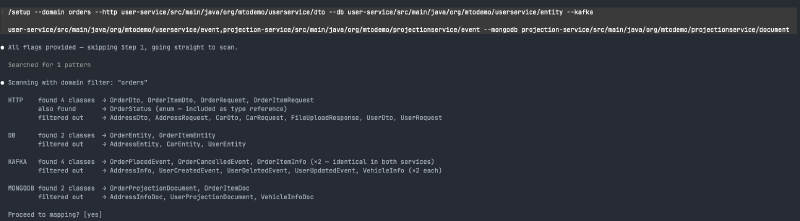
Type yes to proceed to mapping.
Mapping #
Setup reads the fields in each class and maps them into a chain:
OrderRequest + OrderDto → OrderEntity → OrderPlacedEvent / OrderCancelledEvent → OrderProjectionDocFor each mapping it reports its confidence level. If a mapping is unambiguous — consistent names, majority field overlap, clear parent/sub relationships — it is marked ✓ CONFIDENT and proceeds automatically. If there are multiple candidates or low field overlap it stops and asks you to decide.
Setup also detects cross-domain references. Every order class contains a userId field that references the users domain. Setup flags this and notes that happy-path tests must create a real user first — the PLACEHOLDER_USER_ID constant is only valid for validation (400) tests where the service rejects before touching the database.
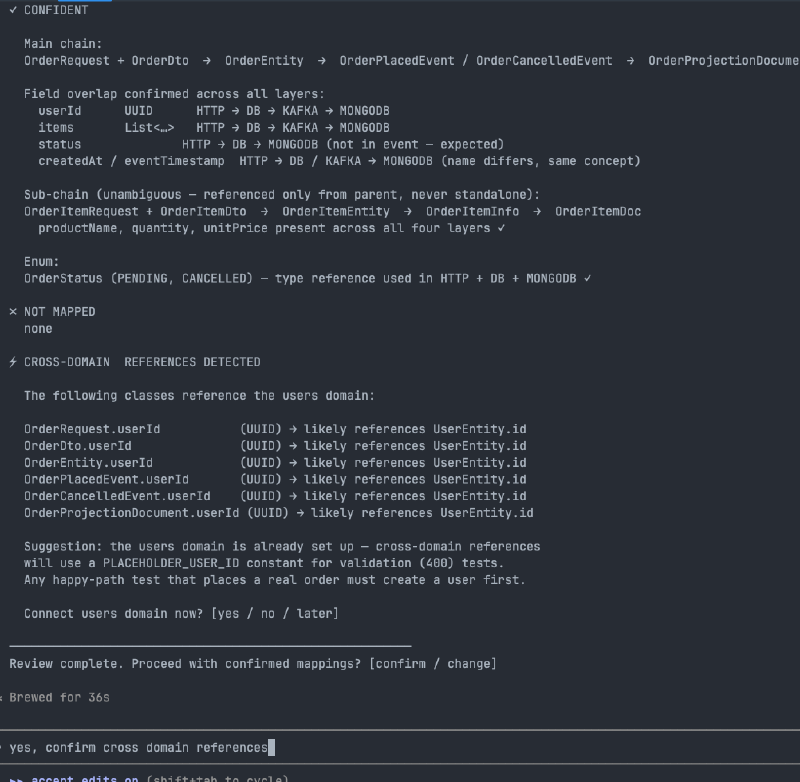
Type confirm to generate.
Generated files #
Setup writes the full support layer for the orders domain:
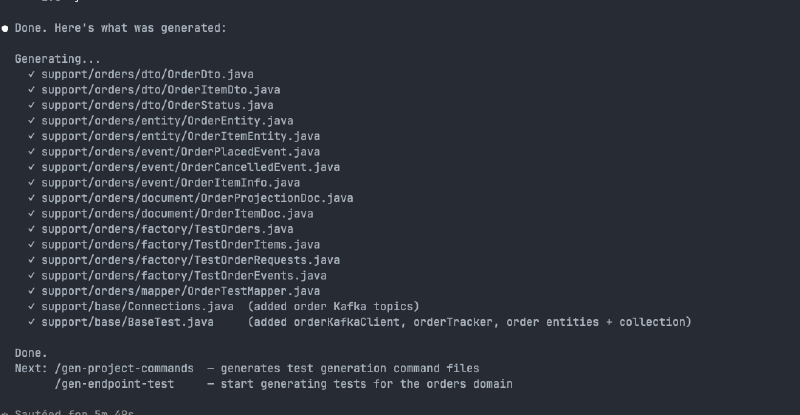
It also patches the existing BaseTest and Connections without overwriting them — adding orderKafkaClient, orderTracker, the order Kafka topics, order entities to the Postgres wrapper, and the order_projections collection to the Mongo wrapper.
Step 2 — Run /gen-project-commands to generate domain-specific slash commands
#
After the support layer is in place, run /gen-project-commands. It scans the entire test infrastructure — all clients, factories, mappers, request classes, validation constraints, and cross-domain dependencies — and generates four tailored command files per domain into .claude/commands/<domain>/.
/gen-project-commandsNo arguments. It finds all domains automatically from the test module structure.
For the orders domain it produces:
| Command | Invocation |
|---|---|
| Endpoint tests | /orders/gen-endpoint-test |
| Flow tests | /orders/gen-flow-test |
| Component tests | /orders/gen-component-test |
| End-to-end tests | /orders/gen-e2e-test |
The same set is generated for the users domain under /users/.
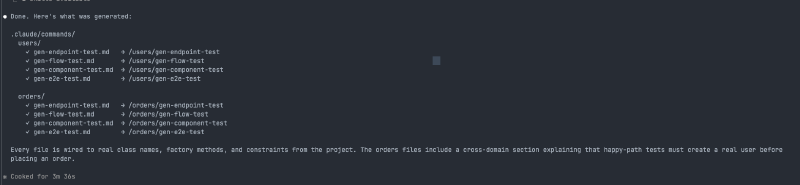
Each file is pre-loaded with the real class names, factory methods, field constraints, Kafka topics, and cross-domain setup patterns for that specific domain — no template placeholders.
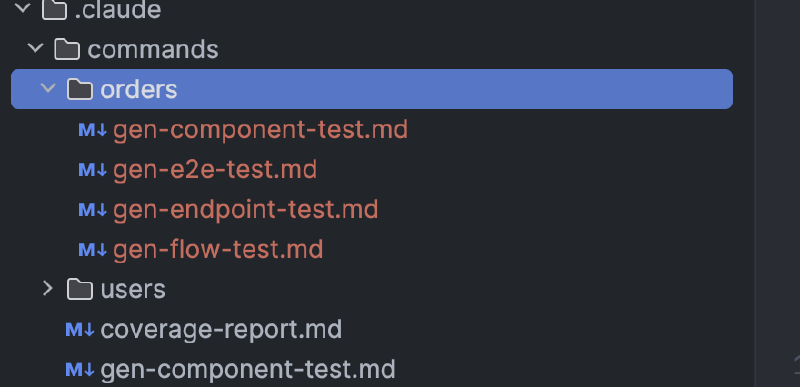
Step 3 — Generate endpoint tests with /orders/gen-endpoint-test
#
With the domain commands in place, run the endpoint test generator. Each command takes a plain-English description of what to generate — class names, endpoints, and scope.
/orders/gen-endpoint-test PlaceOrderApiTest, GetOrderApiTest, CancelOrderApiTest — happy path + all validation and error cases for each endpointThe command reads the constraint table, factory methods, cross-domain dependency rules, and reference test suite baked into the command file, then generates a complete, compilable test class per endpoint with no manual editing required.
PlaceOrderApiTest — covers POST /api/orders:
- Happy path: creates a real user first (cross-domain dependency), places an order, asserts 201 response matches request, verifies persistence in Postgres via
postgresClient.findByFields() - Null
userId→ 400 - Null and empty
itemslist → 400 - Blank, null, and oversized
productName→ 400 - Null, zero, and negative
quantity→ 400 - Null, zero, and negative
unitPrice→ 400
GetOrderApiTest — covers GET /api/orders/{id}:
- Non-existent id → 404
- Happy path: places an order, retrieves by id, asserts response matches
CancelOrderApiTest — covers PUT /api/orders/{id}/cancel:
- Non-existent id → 404
- Happy path: places an order, cancels it, asserts 200 with
CANCELLEDstatus, verifies updated row in Postgres

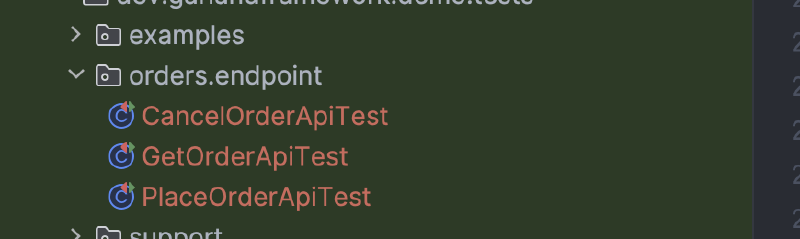
Fixing generated output #
Generated code sometimes needs correction — a wrong return type, a missing import, a method signature that doesn’t match the framework API. You don’t need to fix these manually.
Just tell Claude what’s wrong and it will fix it. Because /setup and /gen-project-commands already ran in the same session, Claude has full context: the actual class names, method signatures, client types, factory patterns, and framework constraints. It can diagnose and correct the issue the same way a developer would — by reading the affected file, understanding the mismatch, and applying a targeted fix.
In this walkthrough, TestOrderRequests.cancelOrder() was initially generated with the wrong return type (HttpCallRequest<OrderDto> instead of HttpCallRequest<Void>) because the cancel endpoint takes no request body. A single build pointed to the error, and asking Claude to fix it produced the correct result immediately — with an explanation of why: HttpCallRequest<T> represents the request body type, not the response type. The response type is always specified separately in makeCall(200, OrderDto.class).
This loop — generate, build, fix — is fast because the context is already there.
Step 4 — Run the tests and fix what fails #
Generated tests may not pass on the first run. That is expected and not a problem — the fixes are quick because the full context is already in the session.
In this walkthrough, running the endpoint tests after generation surfaced two issues in the entity mirrors:
Missing @Column(name=...) mappings. Spring Boot applies a snake_case naming strategy at runtime, so productName becomes product_name in the database. The test HibernateWrapper does not apply this strategy, so camelCase fields that map to snake_case columns require an explicit @Column(name = "product_name") annotation. The same applied to unitPrice, userId, and createdAt.
Lazy loading outside a session. The items collection on OrderEntity was loaded lazily by default, which fails when accessed outside a Hibernate session. Adding fetch = FetchType.EAGER — the same pattern used by UserEntity — resolved it.
Both fixes were single-line changes. Claude identified them from the stack traces, knew exactly which entity fields to annotate, and applied the corrections without any manual investigation. The tests went from 0 passing to 17/17 in two iterations.
The generated support layer, factories, mappers, and command files give Claude all the guardrails it needs to fix issues accurately — it is not guessing, it is working from the actual project structure it built.
Step 5 — Update the generation command files with what you learned #
After fixing test failures, update the command files to record what you discovered. Every domain command file has a Learned patterns section at the bottom, empty at generation time and meant to be filled in as you work.
This is the same thing a real engineer does when they join a team — they note the quirks, the non-obvious mappings, the framework behaviours that bit them once and should never bite anyone again. The difference is that these notes are read automatically by Claude every time a generation command runs for that domain.
For the orders domain, after this walkthrough the learned patterns section in orders/gen-endpoint-test.md would be updated with:
## Learned patterns

- OrderItemEntity requires explicit @Column(name=...) for snake_case columns:
  productName → @Column(name = "product_name")
  unitPrice   → @Column(name = "unit_price")
  The test HibernateWrapper does not apply Spring Boot's naming strategy.

- OrderEntity also requires explicit mappings:
  userId    → @Column(name = "user_id")
  createdAt → @Column(name = "created_at")

- OrderEntity.items must use fetch = FetchType.EAGER — lazy loading
  fails when the collection is accessed outside a Hibernate session.

- HttpCallRequest<T> is the request body type, not the response type.
  GET and body-less PUT return HttpCallRequest<Void>.
  The response type is always specified in makeCall(200, OrderDto.class).
The next time anyone generates a test for the orders domain — a new endpoint, a new flow, a new team member — Claude reads these notes and gets it right from the start. No repeated debugging, no re-learning the same lessons.
Step 6 — Repeat for flow, component, and end-to-end tests #
The same process applies to the other three generation commands. Each one has its own domain-specific command file pre-loaded with the right factories, mappers, clients, and cross-domain setup patterns.
/orders/gen-flow-test OrderFlowTest — place then cancel lifecycle
/orders/gen-component-test OrderApiToKafkaTest — place order publishes event and persists to Postgres
/orders/gen-component-test KafkaToOrderProjectionTest — order event projected to MongoDB
/orders/gen-e2e-test OrderEndToEndTest — place and cancel order full chain
Generate, build, fix if needed, repeat.